Local SEO, measured properly
Everything you needto win Google Maps— in one dashboard
RankMapp is not just a rank tracker. It scans your position at every point on the map, finds the rivals taking your pins, checks 18 things on your website, hands you a citation list built for your country, and tells you what to do next in plain words.
- 9tools in one dashboard
- 49GPS points per keyword
- 1,221citation sites, 61 countries
- 18checks on your website


DESTIN Bangkok
Sukhumvit, Bangkok · European fine dining
4.6 ★★★★★ (612)
Ranking distribution
- Excellent (1–3) 17
- Good (4–7) 15
- Medium (8–12) 10
- Poor (13–20) 6
- Not found 1
Click any pin for the full result list at that point
A real 7 × 7 grid over Sukhumvit — click any pin to see what somebody standing there would find. First place at the restaurant door, gone by the edge of the district, and that whole story is invisible in a single ranking number. The map and the grid are real; the ranks and business names are a worked example.
Nine tools, one subscription
Not a rank tracker with extras bolted on. Nine screens that all read from the same scan, which is the only reason their numbers agree with each other. Every one is on every plan — the plans differ in how much, not in what.
01Overview
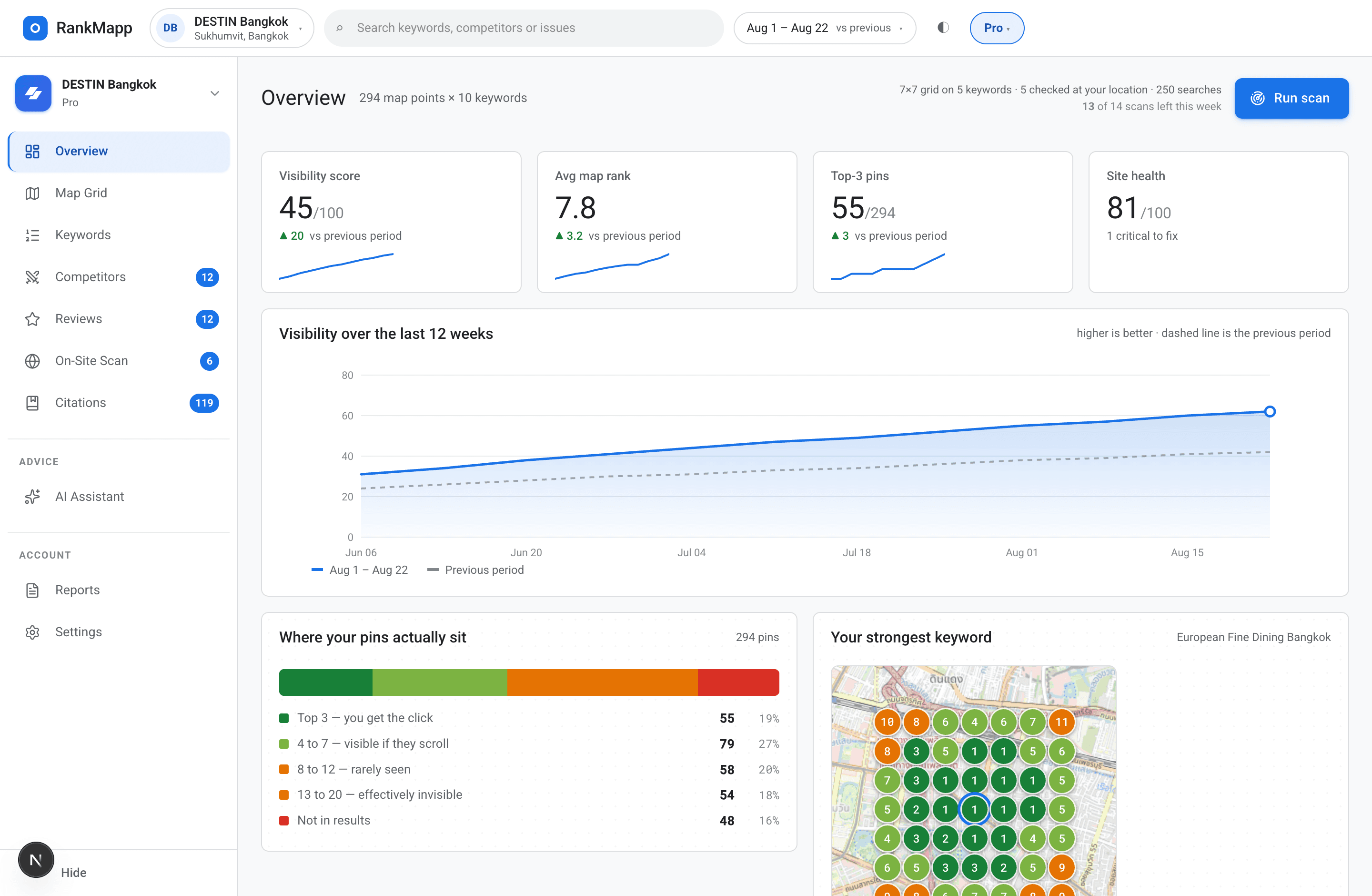
Overview — the whole picture on one screen
Open the dashboard and the state of your local search is already there: where you rank on average, what moved since the last scan, how far your citations have come, and the one thing worth doing today.
What is inside
- Average position across every pin in your grid, with the change since last scan
- Top-3, top-10 and not-found pin counts, so you can see the shape not just the average
- Keywords that improved and keywords that slipped, side by side
- Your website score out of 100, with the number of critical failures
- Citation strength and progress against your weekly and monthly targets
- Review gap: your count and rating against the rivals holding your pins
- A “next up” list — the single highest-value action, with the reason attached
- Scans left this week, and exactly what the next one will cover
02Map grid
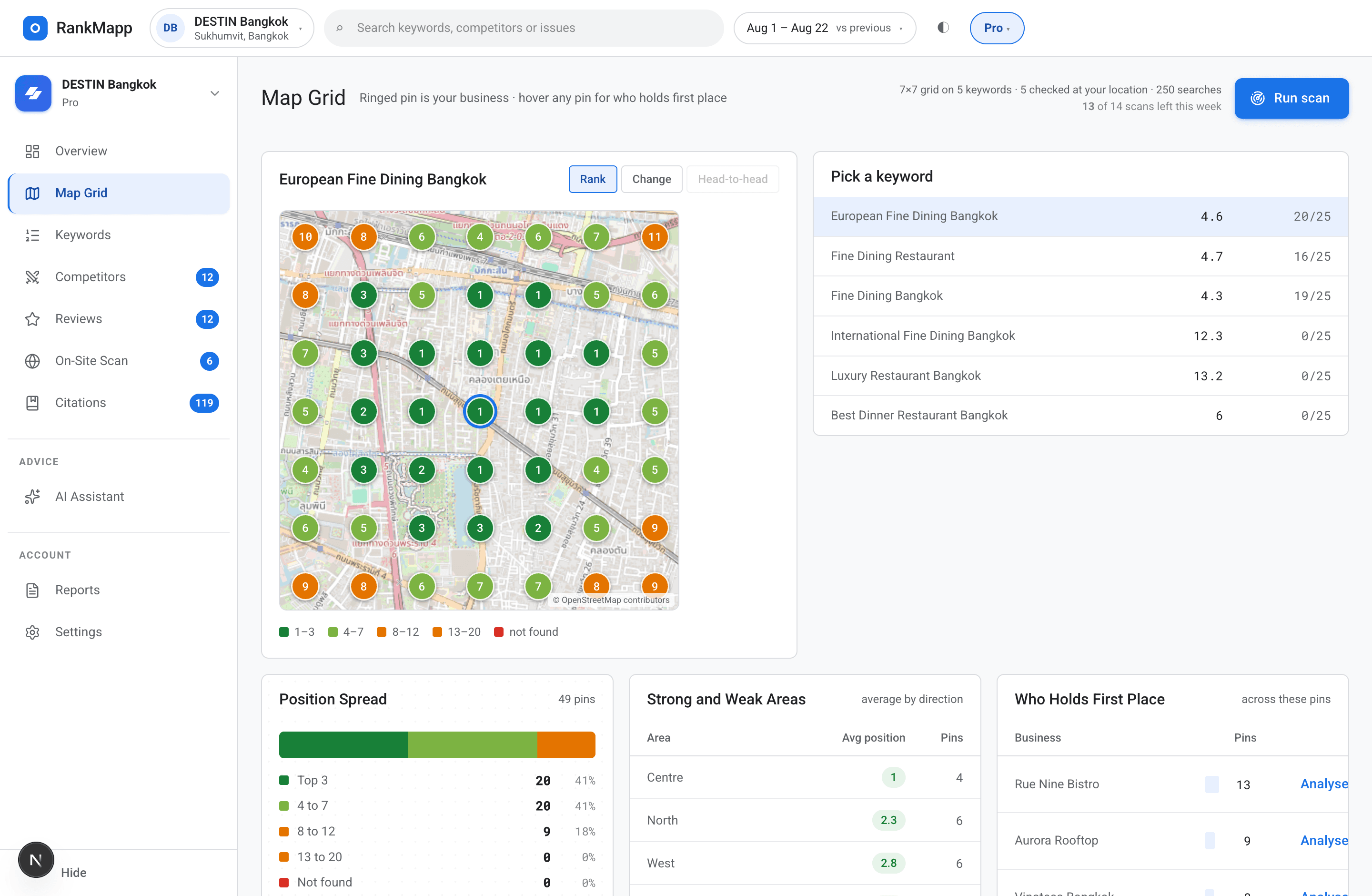
Map grid — your rank at every point, on a real map
Pick your business, add your keywords, and RankMapp lays a grid over your actual area. Every pin is a real Google Maps search run at that pin's own coordinates, then coloured from green at rank 1 to red past rank 20.
What is inside
- Square grids from 3 × 3 up to 7 × 7 — 9, 25 or 49 real points per keyword
- A real street map behind the pins, centred on your business
- Top 10 or top 20 results read at every single point, depending on plan
- Click any pin to see the full result list at that coordinate, in order
- Click a competitor in that list to redraw the map from their side
- Paste a Google Maps link and the coordinates are read straight out of it
- Your country is detected from the pin and drives the whole citation list
- A cost estimate before the scan, and the exact spend after it
Cost is bounded on purpose. Your top keywords get the full grid; the rest are checked at the business location, because a rank table never needed 49 points to show one number.
03Keywords
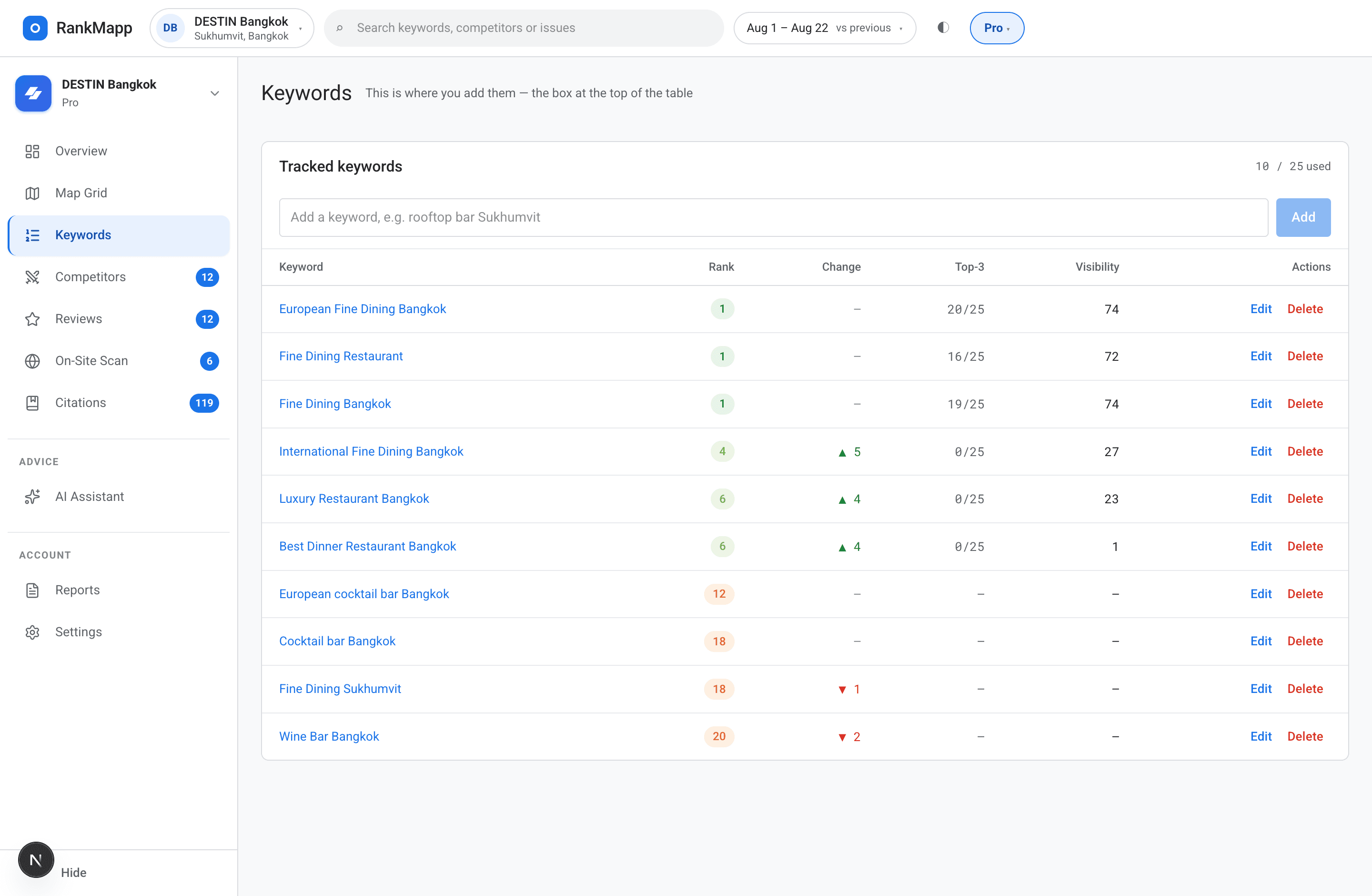
Keywords — every phrase, with its history and its direction
The keyword table is fed by the scan itself, not by a number somebody typed in once. Positions, movement and history all come from the same run that drew the map, so the two can never disagree.
What is inside
- Add, edit and delete keywords — 3 on trial, up to 50 on Agency
- Current position, previous position, and the arrow between them
- Green for up, red for down, grey for held — no decoration for its own sake
- Outside the top 20 is shown as “not found”, never dressed up as rank 21
- Open any keyword for its own dated chart across every scan you have run
- See which rivals hold the pins for that specific phrase, counted
- Sort by position, by movement, or by how contested the phrase is
- Mark which keywords get the full grid and which get a single check
One source of truth
The map and the table are built from the same scan, in the same second. There is no second pipeline to fall out of sync.
History that is actually dated
Each scan appends a point with its timestamp, so you can tell whether your work landed or the market simply moved.
Contested, per keyword
Not one overall competitor — a per-phrase count of who holds what. It is usually a very different list keyword to keyword.
04Competitors
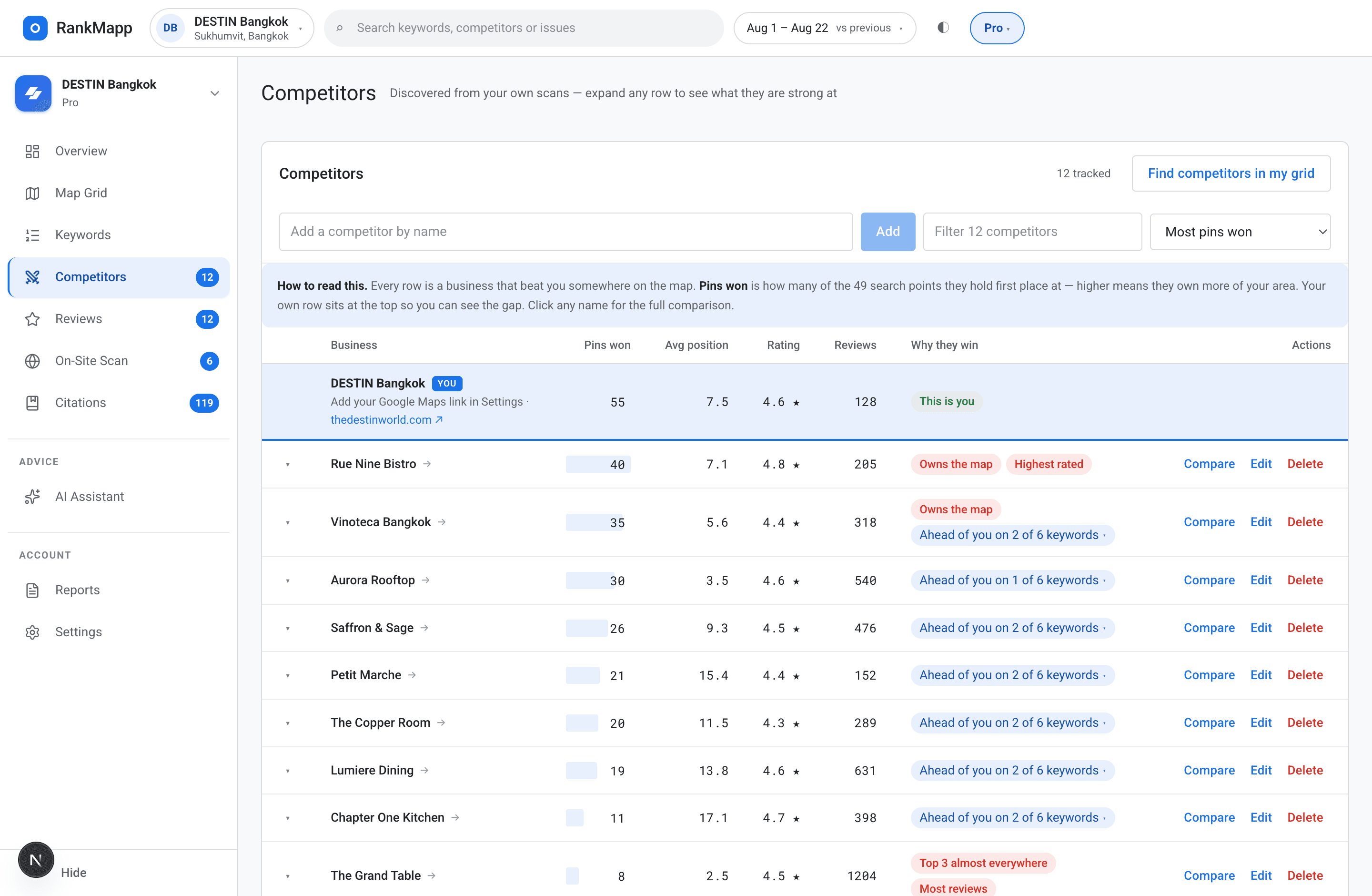
Competitors — the rivals taking your pins, ranked by how many
Competitors are not a list you type in. They are discovered from your scan: every business that held a pin in your grid, counted, sorted, and put next to you with your own listing at the top.
What is inside
- Up to 10 rivals surfaced automatically from real pin ownership
- Your business pinned at the top of the table for direct comparison
- Pin count, average position, rating, review count and review velocity per rival
- Click any competitor for a full head-to-head panel
- Keyword-by-keyword verdict: which phrases they beat you on and by how much
- Their strengths as clickable chips — reviews, rating, category match, proximity
- Redraw the whole map from a competitor's point of view
- Track up to 200 competitors on Agency
Found, not typed
The businesses that actually appeared in your area's results — ordered by how much of your grid they hold.
Honest comparison
Head-to-head counts the real pins for each phrase. No single overall average pretending to describe ten different fights.
Their side of the map
One click redraws the grid from a rival's position, so you can see the streets they own that you never appear on.
05Reviews
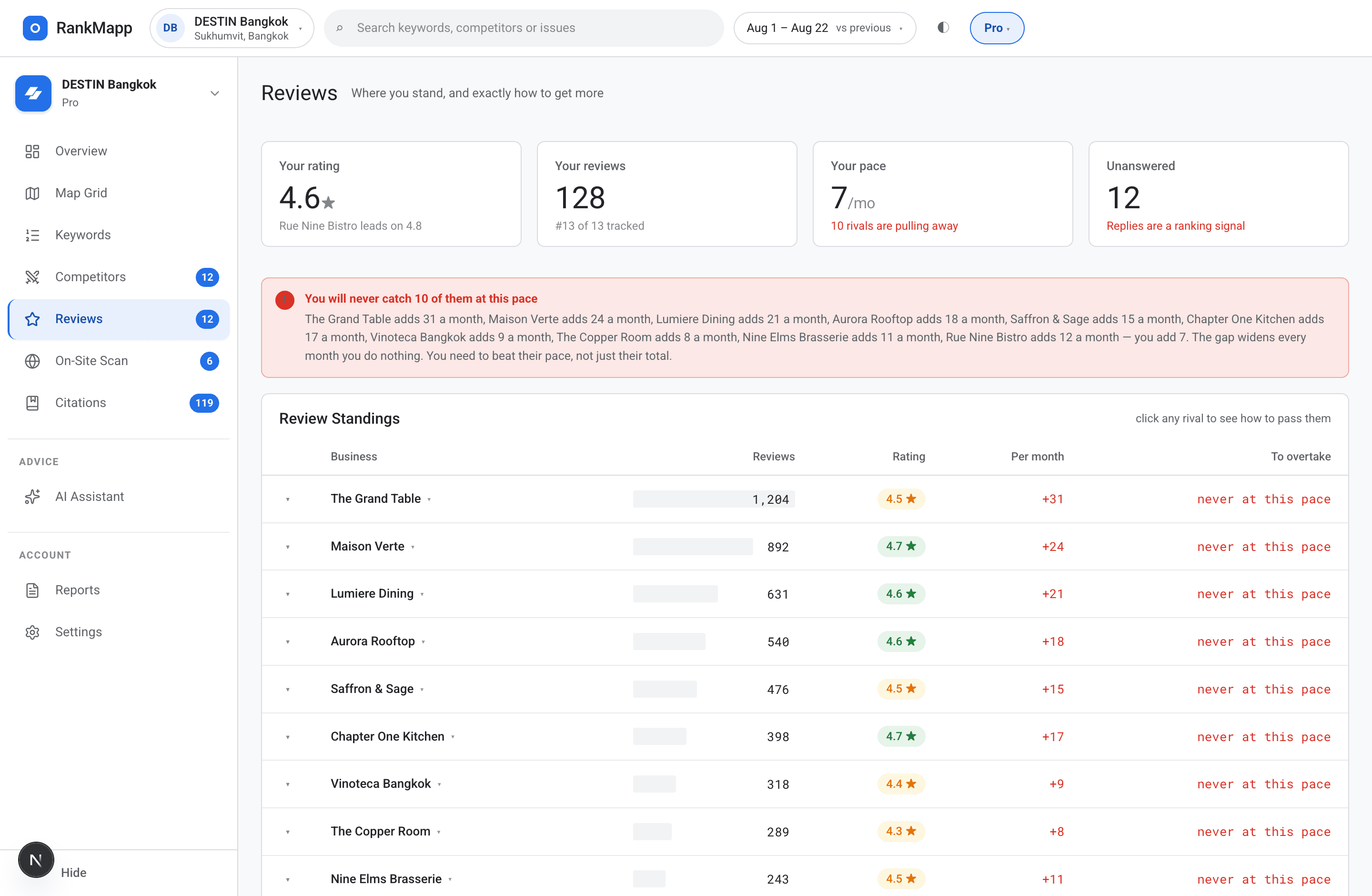
Reviews — the gap, in a number you can act on
Reviews are one of the strongest local signals and the easiest to measure. RankMapp compares your count and rating against the rivals holding your pins, then hands you the tactics that close the gap fastest.
What is inside
- Your review count and rating next to every competitor found in your grid
- The gap to the area average and the gap to the area leader, in plain numbers
- Review velocity per rival — who is pulling away and how fast
- How many reviews you need to reach the average, and to reach first place
- A set of ranked tactics for asking, ordered by how quickly each one works
- Review data comes from the same scan as the map — one source, not two
06Website scan
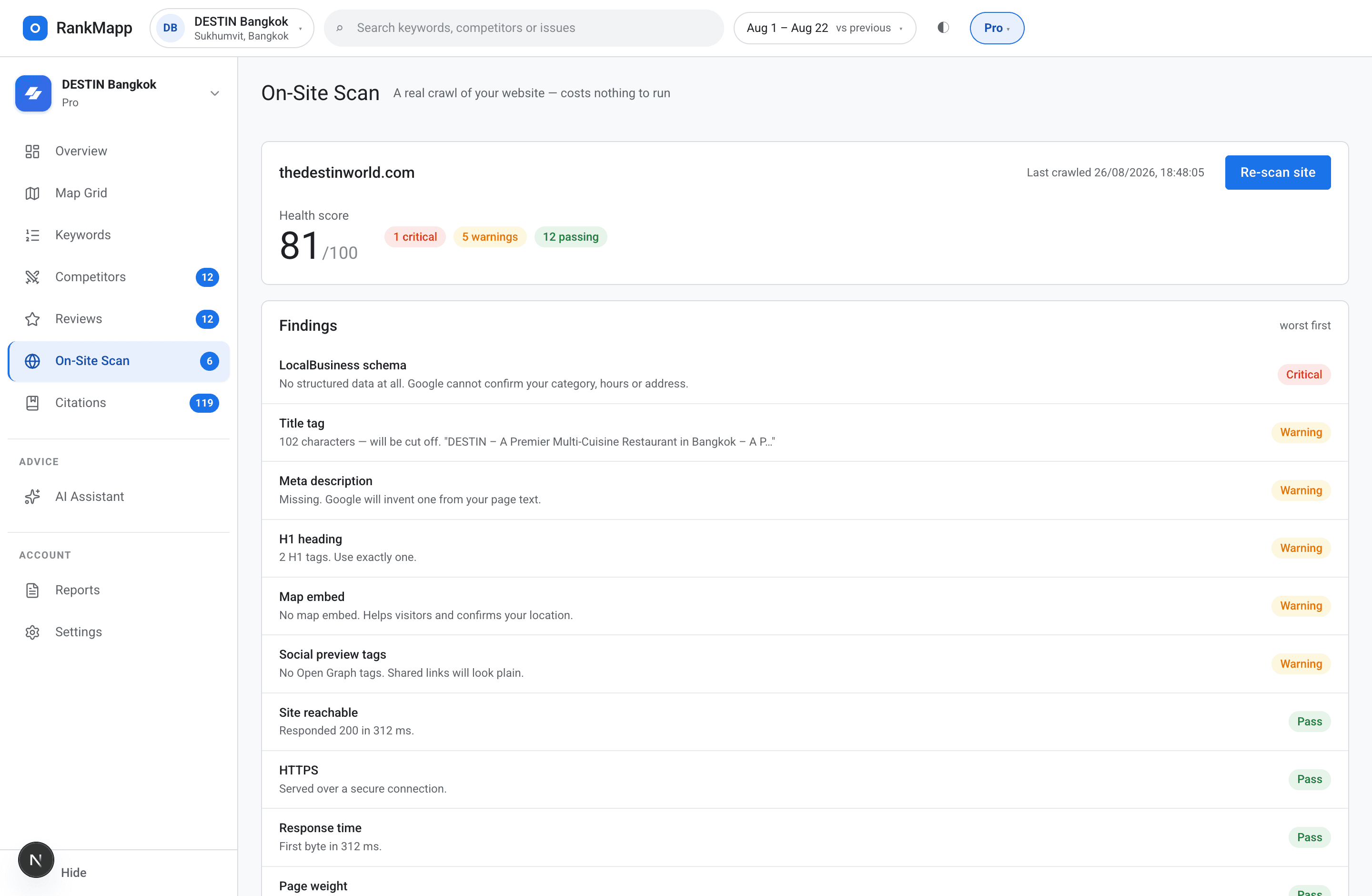
Website scan — 18 checks on the site behind the listing
Your Google listing and your website have to agree. RankMapp fetches your site for real, checks the things that decide whether Google trusts the pair, scores it out of 100 and puts the failures first.
What is inside
- A real fetch of your page — not a cached lookup or a third-party score
- Local signals: LocalBusiness schema, phone on page, address in the text, map embed, business name
- Technical basics: HTTPS, response time, page weight, mobile viewport, canonical tag
- Crawl files: robots.txt and sitemap.xml presence
- What Google shows: title tag, meta description, a single H1, image alt text, Open Graph
- Every check returns pass, warning or critical — with the actual value found
- A score out of 100 with critical failures sorted to the top
- Re-run any time to confirm a fix actually landed
The local signals
Schema, phone number, address text, map embed, business name. These are the ones that tie your site to your listing.
The technical basics
HTTPS, response time, page weight, mobile viewport, canonical tag, robots.txt and sitemap.xml.
The pieces Google shows
Title, meta description, one H1, image alt text, and Open Graph tags for when somebody shares the link.
07Citations
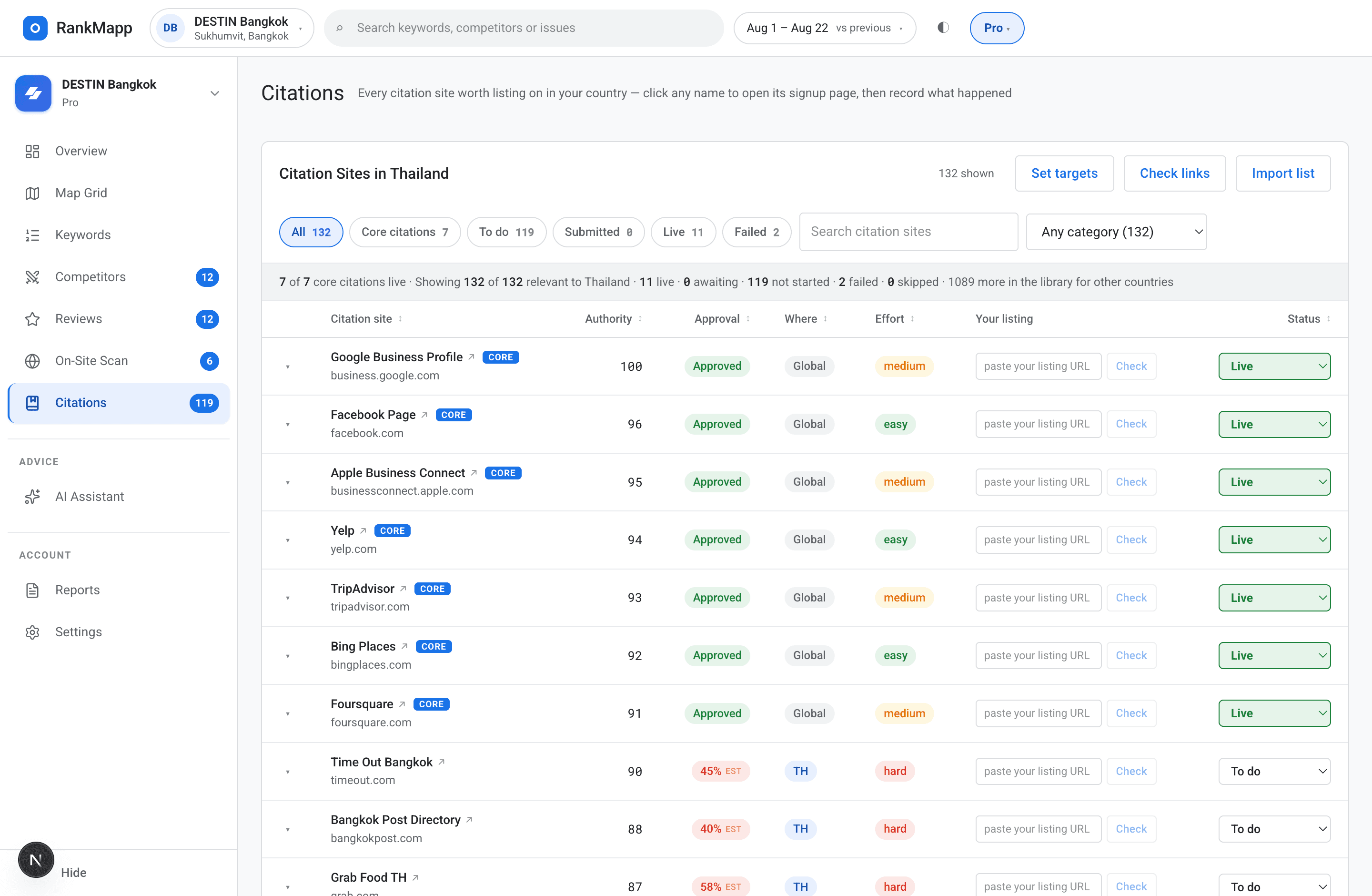
Citations — a directory list built for your country
The country of your map pin decides the list. A business in Thailand does not need the same directories as one in Ireland, and RankMapp does not pretend otherwise.
What is inside
- 1,221 directory and citation sites across 61 countries
- Filtered automatically to the country of your map pin
- A direct submit link on every row — straight to that site's signup page
- Step-by-step instructions per directory, written out, not implied
- Sort by authority, approval rate, effort or status
- Paste your live listing URL back in and RankMapp checks it for you
- Live turns the row green; failed keeps a note so nobody repeats it
- Weekly and monthly targets with a bar that fills as you go
- Citation strength, broken into its parts: how many live, how much authority, how much of your country covered
- A warning when you submit too many in one week — bursts look exactly like what they are
Country-aware, not generic
The global heavyweights first, then everything relevant where you actually trade. No point sending a Bangkok restaurant to a US-only directory.
Progress you can see
A running count against your target with a filling bar. It tells you whether you are on pace without you doing the arithmetic.
Scored, with the parts visible
One citation-strength number, and underneath it the live count, the authority carried, and the share of your country list covered.
08AI assistant
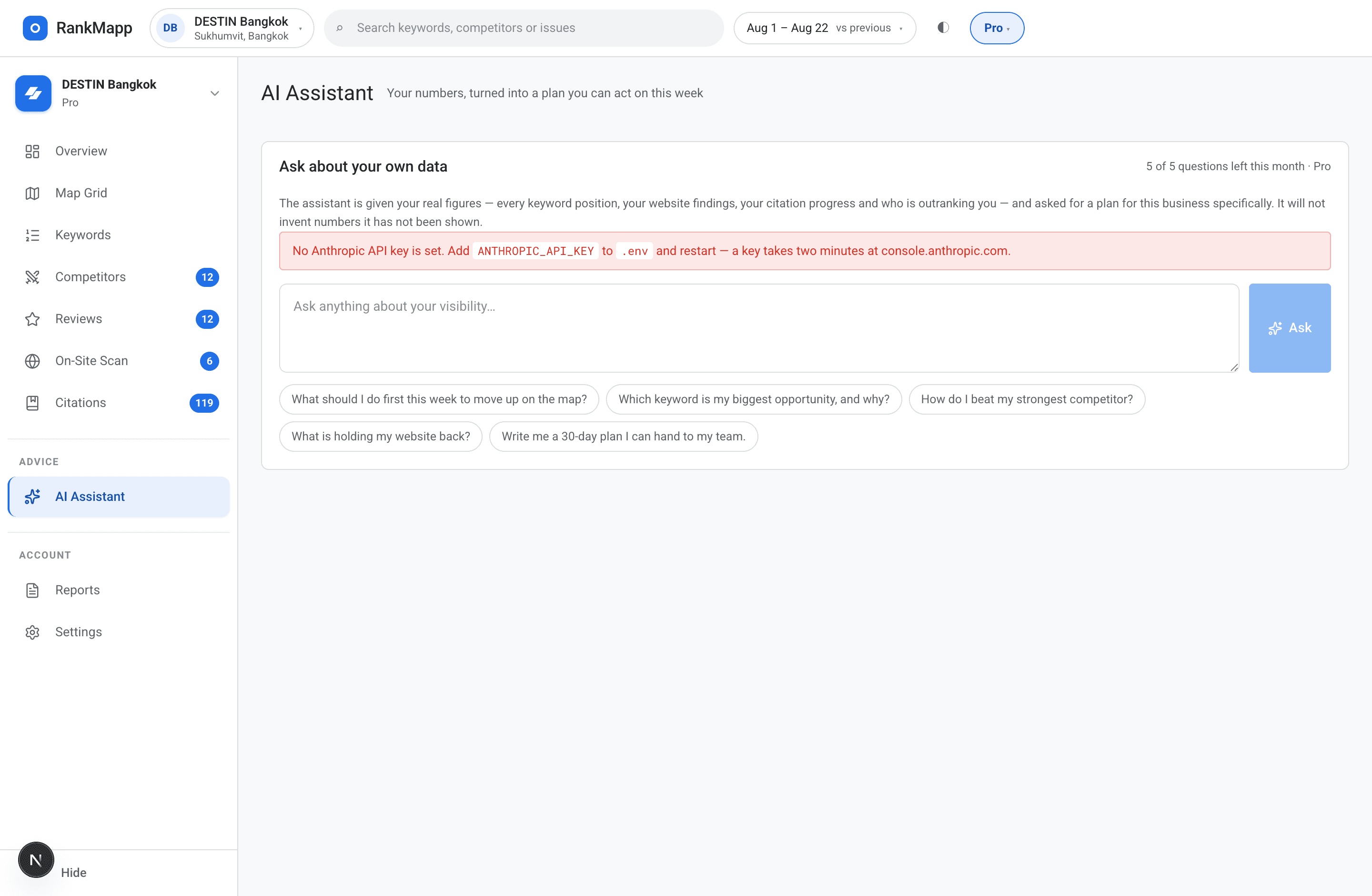
AI assistant — ask about your own data, get a plan back
The assistant reads your scan, your citations and your website score before it answers. It is not a general chatbot bolted onto a dashboard — it has your actual numbers in front of it.
What is inside
- Ask what to fix first and get an ordered answer with your own figures in it
- Ask why a keyword slipped and it looks at the pins that changed
- Ask which citation to do next and it reads your country list and your progress
- Included in every plan — 1 question on trial, 3 on Starter, 5 on Pro, 10 a month on Agency
- No key to buy and no credits to top up: it is part of the subscription
- Your remaining questions are shown before you ask, never after
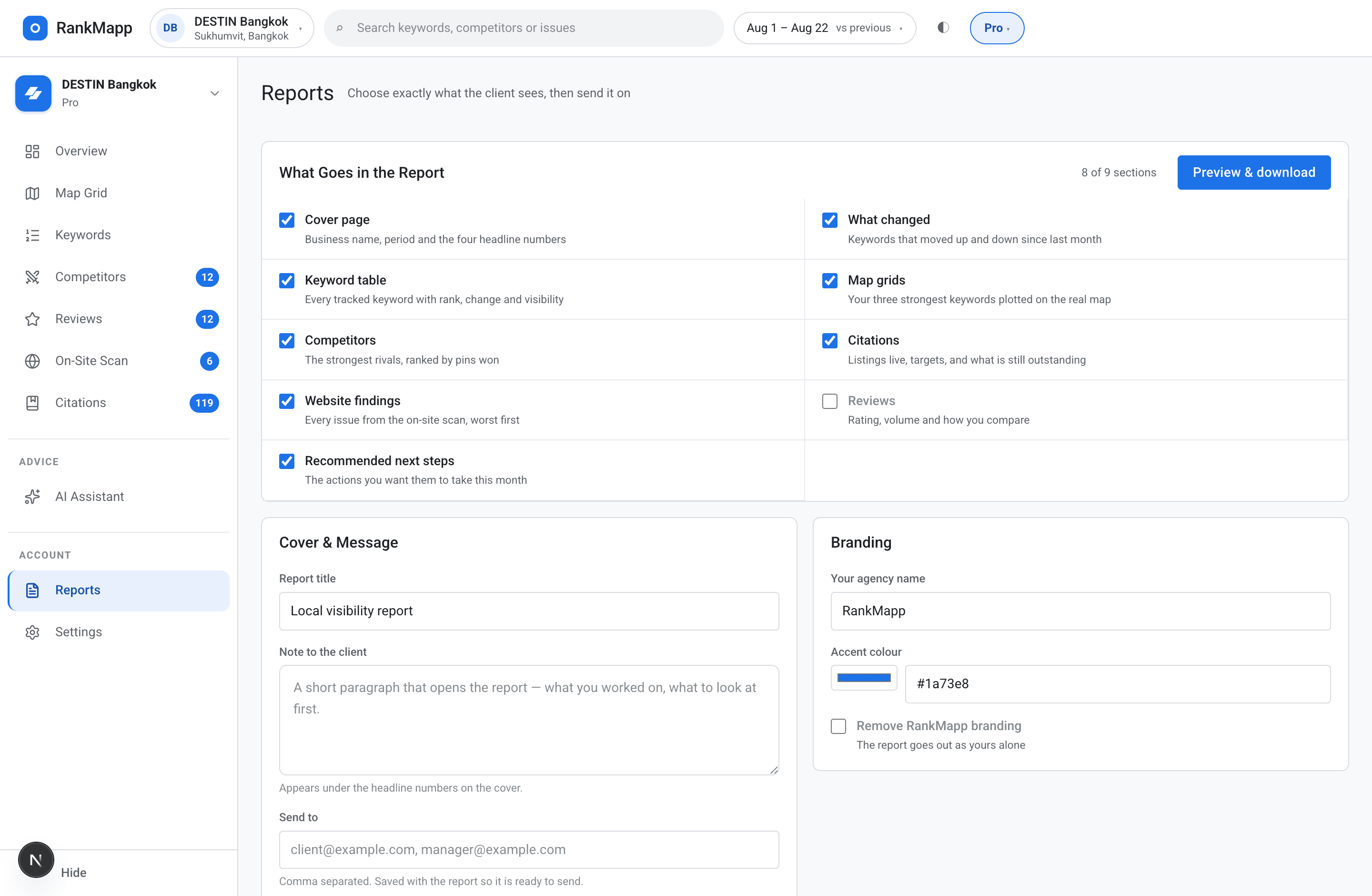
09Reports
Reports — something you can put in front of a client
Choose the sections, choose the order, print it. The numbers come from the same scan the dashboard shows, so there is nothing to reconcile in the meeting.
What is inside
- Pick which sections appear: map, keywords, competitors, reviews, website, citations
- Reorder them to match how you present
- Your agency name and accent colour on the page (Pro and Agency)
- Hide RankMapp branding entirely (Pro and Agency)
- Print or save to PDF straight from the report page
- Every figure traces back to a scan you can open and check
Curious where you actually rank?
Run your first grid on your real business, on your real keywords. Fourteen days, no card, and you will know within five minutes whether the map tells you something you did not know.
- No card to start
- No API keys to buy
- Cancel any time
Why local rank tracking needs more than one data point
Most free rank checkers return one averaged number. It hides the half of your area where you are invisible, which is the half worth knowing about.
| RankMapp | A basic rank checker | |
|---|---|---|
| Data points | 9 to 49 real GPS coordinates per keyword | One averaged result |
| Location bias | Removed — every pin is its own coordinate | Baked in, and personalised to you |
| Competitors | Discovered from who actually holds your pins | Not shown |
| History | Every scan kept, per keyword, dated | Usually none |
| Citations | 1,221 sites filtered to your country, with progress tracking | Not covered |
| Your website | 18 checks, scored and explained | Not covered |
| Next steps | An ordered list, with your own numbers in it | You work it out |
| When it fails | Refuses to save and tells you | Shows a zero and lets you believe it |
If you only check one point, you only ever see one customer's view.
What the numbers are, and what they are not
Rank data is bought from a provider, and providers have bad days. Most tools hide that. This one does not, because a wrong number is worse than no number.
Every pin is a real search
Each point in the grid is its own Google Maps query at its own coordinates. Nothing is interpolated between pins and nothing is estimated.
A failed scan refuses to save
If too few points come back, the scan is discarded and you get a warning — never a map of red pins that only means the provider was down.
Not found is not rank 21
Outside the top 20 is reported as not found. Inventing a position to make a chart look continuous is a lie that compounds every week.
How to check your Google Maps ranking properly
Four steps. The first three take about five minutes.
- 1
Add your business
Name, website, and your Google Maps link — the coordinates are read straight out of it. Two minutes, no card.
- 2
Add your keywords
The phrases a customer would actually type. Three on the trial, up to fifty on Agency.
- 3
Run the scan
RankMapp checks your rank at every pin, draws the map, and fills the keyword table, the competitor list and the review gap from the same run.
- 4
Work the list
Fix what the website scan flagged, submit the citations at the top of your country list, then re-scan and see whether it moved.
Who RankMapp is for
Local businesses
Dentists, plumbers, salons, restaurants, lawyers. See the streets where customers cannot find you, and the specific reason why.
Local SEO agencies
A branded report per client, a citation list you can hand to a junior, and a website scan that writes half the audit for you.
Multi-brand owners
One dashboard per business, the same nine tools on each, and a comparison you can actually defend in a meeting.
People doing it themselves
No jargon and no course required. An ordered list of what to do next, and a number that tells you whether it worked.
Pricing that starts at nothing
All nine tools are on every plan. What changes is the size of the grid, how many keywords and scans you get, and how many AI questions a month.
Free trial
Free
See your real map grid before paying anything
- 3 keywords, 1 business
- 3 × 3 grid on your main keyword
- Top 15 citations
- 1 AI question
- 14 days
Starter
$19/month
One business, the essentials, nothing you will not use
- 10 keywords, 1 business
- 5 × 5 grid on your 3 main keywords
- Full citation library
- 3 AI questions a month
- Website scan and reports
Pro
$49/month
Deeper data, the full grid, reports you can send on
- 25 keywords
- 7 × 7 grid on your 5 main keywords
- 14 scans a week
- Competitor deep dives
- 5 AI questions a month
- White-label client reports
Agency
$99/month
Built around how you work, with everything unlocked
- 50 keywords
- 30 scans a week
- Unlimited competitor tracking
- 10 AI questions a month
- Custom report sections and branding
- Priority support
No card to start the trial · Cancel any time · Every limit is enforced by the server, and the dashboard always shows what you have left
What actually moves the pins
RankMapp shows you where you stand. These are the habits that turn the red pins green.
Get your name, address and phone identical everywhere
Character for character, across your Google profile and every directory. Mismatches are the most common reason a listing stalls.
Keep reviews coming steadily
A slow, constant flow beats forty in one week. Recency counts, and so does replying to every single one.
Put fresh photos up
New images signal an active business. Old ones signal a listing nobody has touched in two years.
Fix the website before chasing links
Schema, phone, address and mobile speed are free to fix and directly affect whether Google trusts the pairing.
Work the citation list top down
High authority and high approval rate first. Twenty good listings beat two hundred nobody checks.
Be honest about your service radius
Businesses that try to rank everywhere rank nowhere. The grid shows where you realistically compete — defend that first.
Questions
Is RankMapp only a rank tracker?
No. Rank tracking is one of nine tools in it. The same dashboard also carries keyword history, competitor discovery, the review gap, a 18-point website scan, a country-specific citation library with progress tracking, an AI assistant that reads your own data, and a client report builder. They all run off the same scan, which is why the numbers agree with each other.
What is a geo-grid scan?
It lays a grid of GPS points over your area and runs your keyword from every point, then colours each pin by rank — green where you rank high, red where you are missing. It replaces one misleading average with a map of where you win and where you do not.
Why can I not just search Google Maps myself?
Google personalises what you see. Your own phone factors in your exact location, your history and your device, so you can look like number one at your desk and be invisible two streets over. A grid removes that by querying from neutral coordinates across your whole area.
Why does my ranking change from block to block?
Google weighs the searcher's location heavily, so rank shifts with proximity, review velocity and what your competitors are doing. That is exactly why one number cannot tell you where you stop showing up.
How many scans do I get?
One a week on the trial, four on Starter, fourteen on Pro and thirty on Agency. The limit is enforced by the server, not by hiding a button, and the dashboard always shows how many you have left.
How big is the grid?
3 × 3 on the trial, 5 × 5 on Starter, and 7 × 7 on Pro and Agency — so 9, 25 or 49 real points per keyword. Your top keywords get the full grid and the rest are checked at your business location, which is what keeps the price where it is.
Do I need an API key or credits?
No. The data connection is ours and it is included in the subscription. You will never be asked to open an account with a data provider or top up credits — that is the whole point of paying monthly.
What happens if the data provider fails mid-scan?
The scan is thrown away and you get a warning. Saving a half-finished scan would show you a map of red pins that means nothing, and you would act on it. We would rather show you nothing than something wrong.
Where does the citation list come from?
A library of 1,221 directory and citation sites covering 61 countries. The country of your map pin picks the list, so you see the sites that matter where you actually trade, each with its submit link and its steps.
Can I record the listings I have already built?
Yes. Paste the live listing URL into the row and RankMapp checks it — live turns the row green and counts toward your citation strength, failed keeps a note so nobody wastes an afternoon repeating it.
What does the website scan actually check?
18 things, on a real fetch of your page: LocalBusiness schema, phone, address, map embed, business name, HTTPS, response time, page weight, mobile viewport, canonical, title, meta description, H1 count, image alt text, Open Graph, robots.txt and sitemap.xml among them. Each comes back with the value found and what to do about it.
How does the AI assistant work?
It reads your own scan, citations and website score before answering, so the plan it gives you has your figures in it. It is included in every plan — 1 question on the trial, 3 on Starter, 5 on Pro, 10 a month on Agency.
Can I send reports to clients?
You choose which sections appear and in what order, then print or save to PDF. On Pro and Agency you can put your own agency name and accent colour on it and hide RankMapp branding entirely.
What do I need to enter before anything works?
Three things: your business name, your Google Maps link (for the coordinates), and at least one keyword. Your website URL is optional but unlocks the 18-point scan. Everything else fills itself in from the first scan.
What does the free trial include?
14 days, no card. One location, three keywords, a 3 × 3 grid on your main keyword, the top 15 citations for your country, the full website scan, and one AI question. Enough to see your real map on your real business before you decide.
See where you really rank.
Fourteen days, no card, on your own business. Fix the weak zones, work the citation list, and watch the pins turn green. If the data ever fails, we will tell you instead of guessing.